0 ratings








Item #:
223301673
STARY 360 Laptop privacy screen protector 14 inch 16:10 Ratio (1920x1200)
87% of respondents would recommend this to a friend
Item #:
223301673
JMD 5288
Price Details
Excluding Shipping & Custom charges ( Shipping and custom charges will be calculated on checkout )
*All items will import from US
In stock
 Imported from USA store
QTY:
Order now and get it around Wednesday, September 16
Secured transaction
Ubuy works hard to protect your security and privacy. Our advanced payment security system ensures confidentiality by encrypting your information during transmission using AES (Advanced Encryption Standards) and SSL (Secure Socket Layer) protocols. Your payment details are 100% secure as we do not share your payment details with third party sellers.
Our Top Logistics Partners


Safeguard your data and preserve your screen with our innovative MacBook Privacy Screen, designed for flawless compatibility and superior protection.

Fast
Shipping

Free
Return*

Secure Packaging

100% Original Products

PCI DSS Compliance

ISO 27001 Certified



What Stands Out
Magnetic Installation
Easily attach and remove the privacy screen in seconds without any adhesive residue, offering seamless mobility and convenience for users on the go.
Blue Light Filter
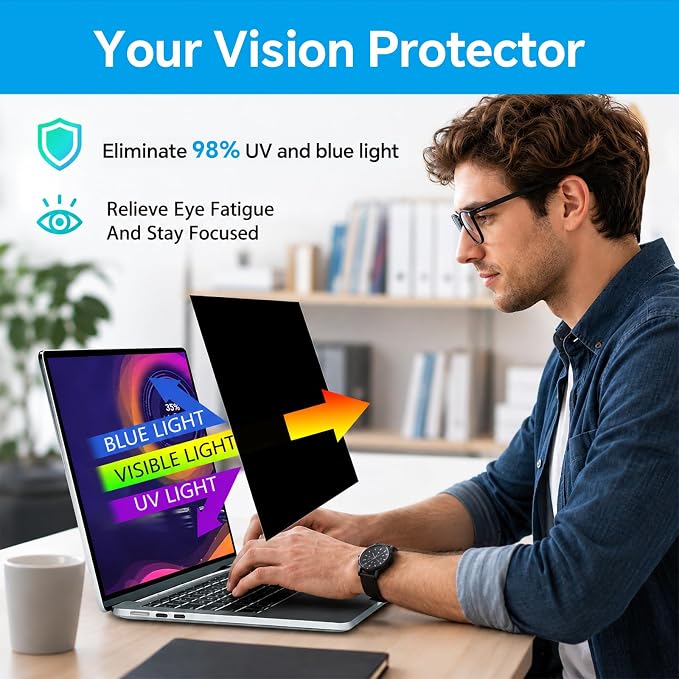
Reduces eye strain by filtering harmful blue light, promoting comfort during long working hours without compromising display clarity and quality.
Privacy Protection
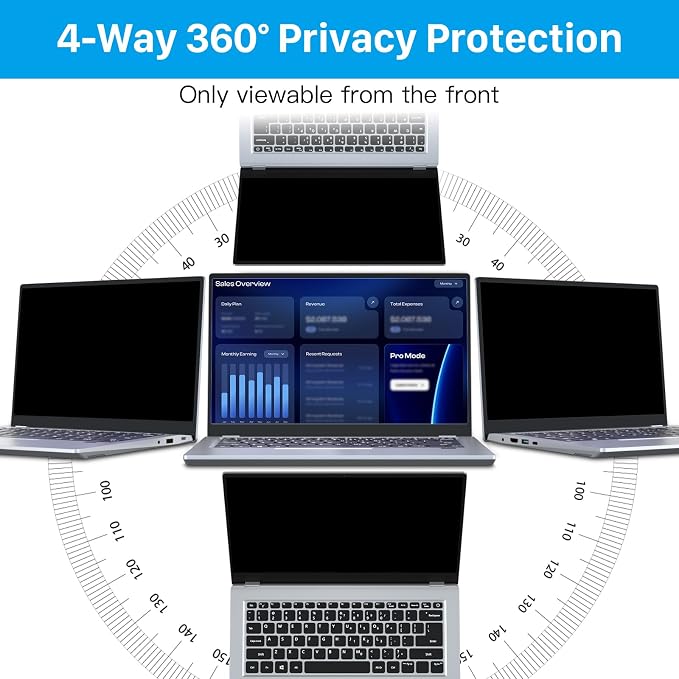
Prevents side-viewers from accessing your screen content, ensuring sensitive information remains confidential and secure in public spaces.
Product Details
| Compatible Devices | Laptop |
| Item Hardness | 6H |
| Compatible Phone Models | privacy for Laptop 14'' |
| Special Features | Anti-Spy, Anti Glare, Removable & Reusable, Easy Install,Anti Blue Light,Anti-Reflection |
| Finish Type | Matte glossy |
| Screen Size | 14 inches (35.6 cm) |
| Screen Surface Description | Matte and Glossy |
| Clarity | 0.99 |
| Item Dimensions L x W | 11.89"L x 7.4"W (30.2 cm) |
| Unit Count | 1 Count |
| Number of Items | 1 |
| Brand Name | STARY |
| Model Name | laptop filter 14" |
| Color | Black |
| Manufacturer | STARY |
| Included Components | Adhesive Strips Set*1, Cleaning Pad*1, Privacy Screen*1 (14"), Product Manual*1, Slide Mount Tab Set*1 |
| Part Number | STARY01 |
| Material | Premium Polyethylene Terephthalate (PET) |
| Brand | STARY |
| Product Dimensions (L x W x H) | 11.89"L x 7.4"W (30.2 cm) |
| Special Feature | Anti-Spy, Anti Glare, Removable & Reusable, Easy Install,Anti Blue Light,Anti-Reflection |
What's in the box
Privacy Screen*1 (14")
Product Manual*1
Cleaning Pad*1
Adhesive Strips Set*1
Slide Mount Tab Set*1
Who Should Buy?

-
Frequent Travelers
Ideal for users who work in public spaces, protecting sensitive information from prying eyes.
-
Office Workers
Perfect for professionals in shared workplaces, ensuring privacy during meetings and collaborative tasks.
-
Students
Beneficial for students studying in libraries or cafes, preventing distractions and protecting academic work.

-
Casual Users
Not suitable for users who rarely need privacy or work in solitary environments.
Product Description
Have any Query? Chat with us
Customer Questions & Answers
-
Question:
What is a Magnetic Privacy Screen for MacBook Pro and Air?
Answer: A Magnetic Privacy Screen is a specially designed filter that attaches to the display of your MacBook Pro 13 Inch (2016-2022) or MacBook Air 13 Inch (2018-2021). It works by limiting the viewing angle of your screen, ensuring that only those directly in front of it can see the content, which enhances your privacy. This screen is particularly beneficial in public spaces like cafes or offices where prying eyes may be present. The anti-glare feature also reduces reflections, making it easier to view your screen in bright environments. -
Question:
How does the removable design of the Magnetic Privacy Screen benefit users?
Answer: The removable design allows you to easily attach and detach the privacy screen whenever needed. This is particularly useful for users who may want to switch between private and public use of their devices. For instance, if you work in an open office setting but wish to use your laptop at home without the privacy filter, you can simply remove the screen. This flexibility ensures that you can maintain your privacy whenever necessary while still enjoying a clear, unobstructed view when the privacy screen is not in use. -
Question:
Does the Magnetic Privacy Screen affect the display quality of my MacBook?
Answer: While the Magnetic Privacy Screen does filter your display, it is designed to maintain high visual quality. Users typically find that the clarity and brightness of their screen remain impressive, thanks to the quality materials used. Additionally, the anti-glare feature reduces reflections that can occur with standard screens, improving visibility outdoors or under bright lights. This makes it ideal for anyone who frequently uses their laptop outside or in brightly lit environments. -
Question:
Can I use the Magnetic Privacy Screen with an external monitor?
Answer: The Magnetic Privacy Screen is designed specifically for MacBook Pro and MacBook Air displays. If you commonly connect your laptop to an external monitor, you will need a separate privacy solution for that screen. However, the screen does help protect your privacy when you are using your MacBook alone, which is often the case in mobile work settings. It’s a great addition for those who work remotely or travel frequently. -
Question:
Is installation of the Magnetic Privacy Screen difficult?
Answer: Installation of the Magnetic Privacy Screen is quite straightforward. Simply align the screen with the top of your MacBook’s display and let the magnets clip into place. No adhesives or tools are required, making it a hassle-free process. This means you can set it up quickly when on the go and remove it just as easily whenever desired. Whether you are commuting or traveling, you can benefit from enhanced privacy without complex installation steps. -
Question:
How does the anti-glare feature work?
Answer: The anti-glare feature is achieved through a specialized coating on the Magnetic Privacy Screen. This coating diffuses sunlight and artificial light to reduce reflections, making the display easier to read in bright conditions. Whether you’re working outdoors, in a coffee shop, or under fluorescent lights, the anti-glare technology enhances user experience, ensuring that you can focus on your work without distraction. -
Question:
What is the viewing angle limitation of the privacy screen?
Answer: The Magnetic Privacy Screen restricts the viewing angle to approximately 60 degrees. This means that anyone sitting to the side of your screen will have a considerably harder time seeing what’s displayed. This feature is particularly advantageous in crowded environments, allowing you to maintain confidentiality when dealing with sensitive information, whether for work or personal use. It's perfect for professionals who often deal with proprietary data or students working on assignments in public areas. -
Question:
Will the privacy screen affect touchscreen functionality on models that have it?
Answer: The Magnetic Privacy Screen is designed to not hinder the functionality of touchscreens on compatible MacBook models. Users can commonly enjoy seamless interactions while using their devices. This means maintaining the tactile experience while benefiting from the additional privacy. So even if you use the touchscreen for navigation or applications, the privacy screen will not impact your ability to interact with your device. -
Question:
How can I clean the Magnetic Privacy Screen without damaging it?
Answer: To clean your Magnetic Privacy Screen, use a microfiber cloth dampened with water or a gentle screen cleaner specifically designed for electronics. Avoid using harsh chemicals or abrasive materials, as these can damage the screen's coating and decrease its effectiveness. Taking care to maintain the screen's cleanliness ensures that you will continue to experience optimal display quality and privacy, contributing to your overall satisfaction with the product. -
Question:
Where can I buy the Magnetic Privacy Screen for MacBook Pro and Air?
Answer: You can buy the Magnetic Privacy Screen for MacBook Pro 13 Inch (2016-2022), M1/M2 and MacBook Air 13 Inch (2018-2021), M1 from Ubuy in Jamaica. Ubuy offers a comprehensive selection of privacy screens with convenient purchase options. Their platform ensures that you can find the right product tailored to your specific device, along with detailed descriptions to assist in your purchase decision.
STARY Screen Filters Editorial Review


STARY Magnetic Privacy Screen for MacBook Pro 13 Inch (2016-2022, M1, M2) offers an essential privacy solution with its matte finish and compatibility with various MacBook models. Users appreciate its easy installation and effective privacy blocking from lateral angles, ensuring that onlookers can't discern your screen contents. While some reviews mention that the dual-functioning sticky tabs could be improved for aesthetics, the screen dimming effect is manageable, making it usable even at lower brightness levels. Additionally, its waterproof design adds to the durability, making it a smart option for protecting your device from both prying eyes and spills.
Customer Reviews & Ratings
1010 customers ratings
-
5 Star
68%
-
4 Star
11%
-
3 Star
9%
-
2 Star
5%
-
1 Star
7%
Review this product
Share your thoughts with other customers
Pros
- Easy to install and remove as needed
- Blocks visibility from 170-degree angles
- Waterproof material enhances durability
- Matte finish helps reduce glare
- Compact design fits perfectly on MacBooks
Cons
- Tabs for installation might not be visually appealing
Platform Trust & Buyer Confidence

JG
Jazz
Verified buyer
“Easy to use and always helpful and sorts any issues I've had past and present”
1 September 2026 · via Trustpilot
EK
Emmanuel
Verified buyer
“I always receive support when I engage customer service. Overall my experience with UBUY has been top notch. Keep up the good work.”
31 August 2026 · via Trustpilot
F
fnd
Verified buyer
“The delivery was fast and the product came undamaged and authentic.”
29 August 2026 · via Trustpilot
LC
Leana
Verified buyer
“Ubuy is extremely efficient and to order online is an easy process. The verity of products to buy is really unlimited! My order was urgent and I got it on time. The products are great! Thank you Ubuy!”
25 August 2026 · via Trustpilot
HL
Hengo
Verified buyer
“Fast, convenient and cheap. Great store!”
27 August 2026 · via Trustpilot
Secure Checkout
Global Delivery
Easy Returns
Genuine Products
Product Price History
Important information
- Limitations : For products shipped internationally, please note that any manufacturer warranty may not be valid; manufacturer service options may not be available; product manuals, instructions, and safety warnings may not be in destination country languages; the products (and accompanying materials) may not be designed in accordance with destination country standards, specifications, and labeling requirements; and the products may not conform to destination country voltage and other electrical standards (requiring use of an adapter or converter if appropriate). The recipient is responsible for assuring that the product can be lawfully imported to the destination country. When ordering from Ubuy or its affiliates, the recipient is the importer of record and must comply with all laws and regulations of the destination country.
- Not all the products listed on Ubuy are for sale, as Ubuy is a global search engine. Products are subject to export/trade regulations.
JMD 5288
Order now and get it around Wednesday, September 16
This item is not restrict in my country.(Please click on above link if this item is not restrict in your country, So our team will review and allow.)
QTY:
Secured transaction
PCI DSS compliant and ISO 27001:2022 certified, with encrypted payments and full buyer protection on every order.
Our Top Logistics Partners
Fastest cross-border delivery
Features & Benefits
- Precision fit for MacBook Air (2018-2021, M1) and Pro (2016-2022, M1/M2).
- Dual Privacy Shield restricts visibility to a narrow angle for optimal security.
- Integrated camera cover slider offers additional privacy protection.
- Quick magnetic installation takes only seconds with a reinforced attachment.
- Filters out 92% of UV light and harmful blue light emissions.
- Matte anti-glare surface reduces reflections by 95%, ensuring clear visibility.
Ubuy Assurance
Experience worry-free shopping with 100% original products, PCI DSS-compliant payment security, ISO 27001-certified data protection, the fastest cross-border delivery, free returns *, and secure packaging on every order.