0 ratings





Item #:
209982636
Canon Color imageCLASS MF662Cdw - Wireless Duplex Laser Printer with Copier, Scanner, 26 PPM
75% of respondents would recommend this to a friend
Item #:
209982636
JMD 147845
Price Details
Excluding Shipping & Custom charges ( Shipping and custom charges will be calculated on checkout )
*All items will import from US
In stock
 Imported from USA store
QTY:
Only 10 items left in stock.
Order now and get it around Wednesday, July 08
Secured transaction
Ubuy works hard to protect your security and privacy. Our advanced payment security system ensures confidentiality by encrypting your information during transmission using AES (Advanced Encryption Standards) and SSL (Secure Socket Layer) protocols. Your payment details are 100% secure as we do not share your payment details with third party sellers.
Our Top Logistics Partners


Produce crisp, colorful documents with fast print speeds of up to 26 pages per minute.

Fast
Shipping

Free
Return*

Secure Packaging

100% Original Products

PCI DSS Compliance

ISO 27001 Certified


What Stands Out
Versatile Functionality
Combines printing, copying, and scanning in one compact device, making it perfect for small offices and home use, meeting diverse document handling needs efficiently.
High-Quality Prints
Delivers vibrant color laser prints at a speed of 26 pages per minute, ensuring professional quality and fast output for business reports and presentations.
Wireless Convenience
Equipped with wireless connectivity, allowing easy printing from various devices, and facilitating seamless integration into modern home and office setups for added convenience.
Product Details
- Color, Wireless, Duplex 3-in-1: Print, scan, copy.
- Fast Print Speeds: Print up to 26 ppm in both color and monochrome and spend less time waiting with a quick first print time of approximately 10.3 seconds.
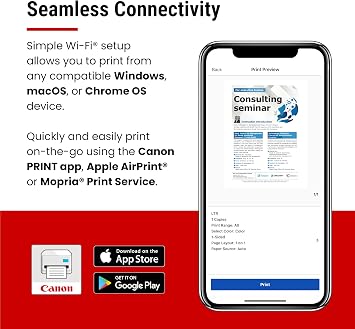
- Easy Wireless Setup: Setup your wireless connection and get up and running in just a few steps.
- 5-inch Color Touchscreen: Get the job done quickly with Application Library - an intuitive and easy to use customizable access to the features you use most.
- Mobile Device Printing: Print from your compatible mobile devices using the free Canon PRINT app, Apple AirPrint and Mopria Print Service.
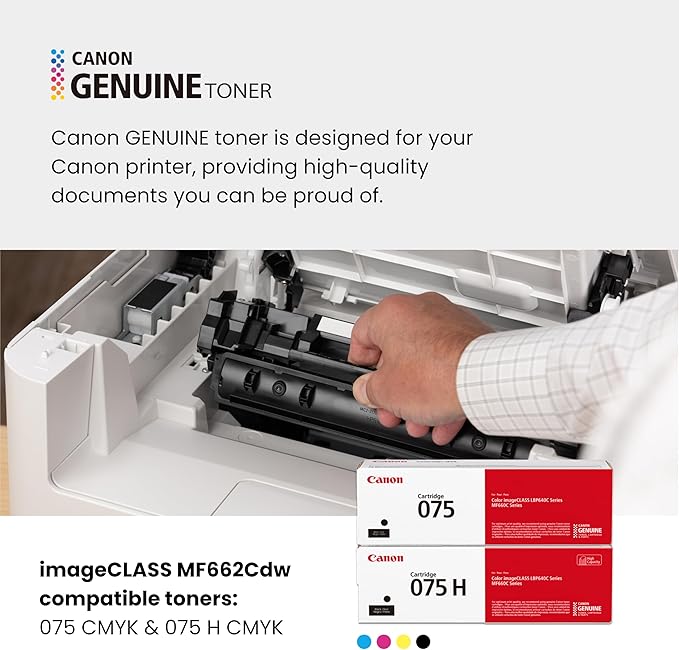
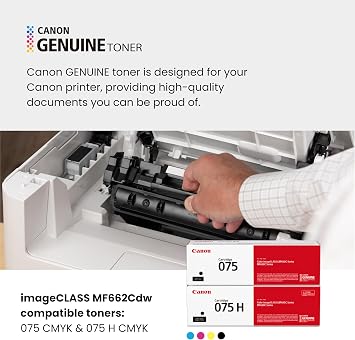
- High-capacity Toner: Uses Canon Genuine Toner 075 / 075 high-capacity, for high-quality output and high page yields that keep up with your printing needs and help limit toner replacements.
- Paper Capacity: 250-sheet standard cassette, 1-sheet multipurpose tray.
- Auto 2-sided Printing: Save paper and limit paper replacements with automatic 2-sided printing.
- ENERGY STAR, EPEAT Silver.
| Printer Type | Laser |
| Other Special Features of the Product | Energy Star |
| Printer Output Type | Color |
| Item Weight | 55.1 Pounds (24.99 kg) |
| Item Dimensions D x W x H | 18.2"D x 16.8"W x 15.7"H (46.2 x 42.7 x 39.9 cm) |
| Print media | Paper (plain) |
| Scanner Type | Flatbed |
| Maximum Copy Speed Black and White | 26 ppm |
| Compatible Devices | Laptops, PC, Smartphones |
| EU Spare Part Availability Duration | 3 Years |
| Ink Color | Cyan, Magenta, Yellow, Black |
| Additional Printer Functions | All In One, Copy, Scan |
| Control Method | Touch |
| Compatible Cartridge | Canon Genuine Toner 075 |
| Number of Trays | 2 |
| Resolution | 600 x 600 |
| Maximum Media Size | Legal (8.5 x 14 inches) |
| Maximum Sheet Capacity | 250 |
| Paper Size | Standard Cassette / 1-sheet Manual Feed Slot: 3" x 5" to 8.5" x 14" Inches (33 x 148.6 x 35.6 cm) |
| Maximum print Resolution Color | 600 x 600 dpi |
| Maximum Print Resolution Black and White | 600 dots_per_inch (1524 cm) |
| Dual-sided printing | Yes |
| Duplex | Automatic |
| Brand | Canon |
| Model Name | Canon Color imageCLASS MF662Cw |
| Model Number | 6928C016 |
| Built-In Media | Canon Genuine Toner 075 CMYK Starter: 500 Yield CMY, 700 Yield Black, Documentation, Power Cord, imageCLASS MF662Cdw Printer |
| Model Series | imageCLASS |
| Specific Uses For Product | Office |
| UPC | 013803382686 |
| Manufacturer | Canon |
| Item Type Name | Laser Printer |
| Unit Count | 1.0 Count |
| Color Pages per Minute | 26 ppm |
| B&W Pages per Minute | 26 ppm |
| Initial Page Print Time | 10.3 Seconds |
| Color | White |
| Printer Connectivity Type | Ethernet, USB, Wi-Fi |
| Hardware Interface | USB |
| Total Usb Ports | 1 |
| Maximum Copy Resolution Color | 600 x 600 dpi |
| Maximum Copy Resolution Black and White | 600 x 600 dpi |
| Connectivity Technology | Ethernet, USB, Wi-Fi |
| Printing Technology | Laser |
| Special Feature | Energy Star |
| Printer Output | Color |
| Maximum Print Speed (Color) | 26 ppm |
| Max Printspeed Monochrome | 26 ppm |
What's in the box
imageCLASS MF662Cdw Printer
Canon Genuine Toner 075 CMYK Starter: 500 Yield CMY, 700 Yield Black
Power Cord
Documentation
Who Should Buy?

-
Small Businesses
Ideal for small enterprises needing efficient printing, copying, and scanning functionalities with wireless capabilities.
-
Home Offices
Perfect for remote workers requiring a reliable, versatile printer for documents, presentations, and more.
-
Schools and Educators
Useful in educational settings for printing class materials and handling multi-functional tasks conveniently.

-
High-Volume Users
Not suitable for environments with extreme high-volume printing needs due to low speed and toner limitations.
-
Casual Home Users
May be excessive for individuals who only print occasionally, leading to unnecessary expenses and maintenance.
-
Mobile Professionals
Less ideal for users needing portable printing solutions, as this model is not designed for on-the-go use.
Product Description
Have any Query? Chat with us
Customer Questions & Answers
-
Question:
What are the key features of the Canon imageCLASS MF653Cdw?
Answer: The Canon imageCLASS MF653Cdw boasts a range of impressive features including wireless printing, duplex printing, and multifunction capabilities (printing, copying, and scanning). It supports mobile printing options like Apple AirPrint and Google Cloud Print, allowing users to print directly from their smartphones or tablets. With a print speed of 22 pages per minute, it’s designed for efficiency, making it ideal for both home and office environments needing versatile document handling. -
Question:
Is the Canon imageCLASS MF653Cdw suitable for small offices?
Answer: Absolutely, the Canon imageCLASS MF653Cdw is well-suited for small offices due to its multifunction capabilities and efficient performance. It combines printing, copying, and scanning functions in one compact design, saving space while increasing productivity. Furthermore, its ability to handle high-volume printing tasks with consistent quality makes it a reliable choice for teams that need quick and efficient document processing. -
Question:
How does wireless printing work with this printer?
Answer: Wireless printing with the Canon imageCLASS MF653Cdw is achieved via Wi-Fi connectivity. Users can connect their devices to the printer's wireless network, allowing them to print documents straight from laptops, tablets, or smartphones without the need for physical connections. This feature is particularly useful in a busy office environment, where different users can seamlessly send print jobs from various devices, enhancing workflow efficiency. -
Question:
What types of media can the Canon imageCLASS MF653Cdw print on?
Answer: The Canon imageCLASS MF653Cdw is versatile in its media handling, capable of printing on various types of paper including plain paper, envelopes, labels, and glossy photo paper. The printer supports different sizes ranging from letter to legal, making it a great option for diverse printing needs, whether for business documents, marketing materials, or even personal projects. -
Question:
What scanning features does the Canon imageCLASS MF653Cdw offer?
Answer: The Canon imageCLASS MF653Cdw provides robust scanning features including color and black-and-white scanning at high resolutions. Users can scan directly to email, USB, or secure locations on their network. The automatic document feeder enables fast multi-page scanning, making it ideal for digitizing files efficiently and simplifying document management for businesses. -
Question:
Can the Canon imageCLASS MF653Cdw handle high-volume printing?
Answer: Yes, this printer is designed to manage high-volume printing tasks effectively with a monthly print capacity, making it suitable for environments with heavy printing demands. Its speed of printing up to 22 pages per minute means teams can efficiently produce large batches of documents, ensuring workflow remains streamlined in busy office settings. -
Question:
Is there mobile printing support for this printer?
Answer: The Canon imageCLASS MF653Cdw supports mobile printing through various platforms like Apple AirPrint, Google Cloud Print, and Canon's PRINT Business app. This support allows users to print from their mobile devices without the need to install additional drivers. It’s particularly useful for professionals on the go, as they can easily send documents to print from anywhere, enhancing productivity. -
Question:
What are the dimensions and weight of the Canon imageCLASS MF653Cdw?
Answer: The Canon imageCLASS MF653Cdw has compact dimensions, making it suitable for small office spaces. Its lightweight design allows for easy placement within your workspace, while still packing significant functionality. This combination of size and performance ensures it can fit comfortably in various environments without sacrificing capabilities or print quality. -
Question:
How does duplex printing benefit users?
Answer: Duplex printing on the Canon imageCLASS MF653Cdw allows users to print on both sides of the paper automatically, which significantly reduces paper usage and costs. This feature not only promotes sustainability but also creates more professional-looking documents. Ideal for businesses looking to maintain a green footprint or manage their printing budgets efficiently, this feature supports both high-volume and eco-conscious printing. -
Question:
What safety and security features does the printer offer?
Answer: The Canon imageCLASS MF653Cdw includes several security features to protect sensitive data, such as secure print options requiring a password to release documents and network I/O security settings. These safeguards are crucial for businesses that prioritize document confidentiality and compliance with data protection standards. Ensuring that your data is safe while using a multifunction printer enhances overall trust and security within your work environment. -
Question:
Where can I buy the Canon imageCLASS MF653Cdw?
Answer: You can purchase the Canon imageCLASS MF653Cdw from Ubuy in Jamaica. Ubuy offers a comprehensive selection of Canon printers and provides an efficient online shopping experience, ensuring that you can easily find the right model for your printing needs.
Canon Laser Printers 6928C016 Editorial Review


The Canon Color imageCLASS MF662Cdw has garnered a mixed but generally positive reception from its users. Many customers have expressed their satisfaction, particularly with the speed and quality of printing, highlighting the impressive color reproduction that meets their needs for both personal and professional use. Transitioning from a typical inkjet printer to this laser model, users appreciate the machine's efficiency on various media types, including photo paper, and its wireless duplex printing capabilities. Setup is noted as quick and easy, taking minimal time to get functioning right out of the box—a particularly appealing factor for those who prioritize convenience. However, some users raised concerns regarding the printer's tendency to go into sleep mode frequently. The printer can sometimes fail to wake up from this mode, necessitating a manual reset, which can be frustrating. The product does exhibit some weaknesses regarding its app's functionality, where users found limitations in accessing documents and resizing images. The absence of a paper feeder is also a notable drawback for those requiring multi-page scanning. While print quality and speed remain high points, the cost of replacement cartridges brings a mixed view on long-term maintenance expenses. Overall, the Canon Color imageCLASS MF662Cdw is a robust printer perfect for users who require high-quality color prints at home or in a small office, but it may not be the best fit for those needing extensive features for office use or frequent multi-page scanning. ###
Customer Reviews & Ratings
80 customers ratings
-
5 Star
58%
-
4 Star
13%
-
3 Star
10%
-
2 Star
4%
-
1 Star
15%
Review this product
Share your thoughts with other customers
Pros
- Fast printing speed and high-quality color output
- Efficient wireless duplex printing
- Easy setup process
- Compact size, smaller than some previous models
- Good visibility of ink levels through the control panel ###
Cons
- Replacement cartridges are costly
Related Categories
Related Brands
Product Price History
Important information
- Limitations : For products shipped internationally, please note that any manufacturer warranty may not be valid; manufacturer service options may not be available; product manuals, instructions, and safety warnings may not be in destination country languages; the products (and accompanying materials) may not be designed in accordance with destination country standards, specifications, and labeling requirements; and the products may not conform to destination country voltage and other electrical standards (requiring use of an adapter or converter if appropriate). The recipient is responsible for assuring that the product can be lawfully imported to the destination country. When ordering from Ubuy or its affiliates, the recipient is the importer of record and must comply with all laws and regulations of the destination country.
- Not all the products listed on Ubuy are for sale, as Ubuy is a global search engine. Products are subject to export/trade regulations.
JMD 147845
Order now and get it around Wednesday, July 08
This item is not restrict in my country.(Please click on above link if this item is not restrict in your country, So our team will review and allow.)
QTY:
Only 10 items left in stock.
Secured transaction
Ubuy works hard to protect your security and privacy. Our advanced payment security system ensures confidentiality by encrypting your information during transmission using AES (Advanced Encryption Standards) and SSL (Secure Socket Layer) protocols. Your payment details are 100% secure as we do not share your payment details with third party sellers.
Our Top Logistics Partners
Fastest cross-border delivery
Features & Benefits
- Designed for small/home offices and hybrid work environments.
- Fast print speeds of up to 26 pages per minute.
- Easy wireless setup and connectivity from mobile devices.
- Customizable 5-inch color touchscreen for user-friendly experience.
- Includes high-capacity Canon Genuine Toner for less frequent replacements.
- Comes with a 3-year limited warranty backed by Canon's support.