- Home Page /
- Electronics /
- Computer Accessories /
- Tablet Replacement Parts /
- LCD Displays /
- TFT LCD Digitizer Screen Replacement for Sams...
0 ratings


Item #:
223259780
TFT LCD Digitizer Screen Replacement for Samsung Galaxy Tab A9 SM-X110
87% of respondents would recommend this to a friend
Item #:
223259780
JMD 8001
Price Details
Excluding Shipping & Custom charges ( Shipping and custom charges will be calculated on checkout )
*All items will import from US
0 ratings
Write a review
In stock
 Imported from USA store
QTY:
Order now and get it around Wednesday, September 30
Secured transaction
Ubuy works hard to protect your security and privacy. Our advanced payment security system ensures confidentiality by encrypting your information during transmission using AES (Advanced Encryption Standards) and SSL (Secure Socket Layer) protocols. Your payment details are 100% secure as we do not share your payment details with third party sellers.
Our Top Logistics Partners


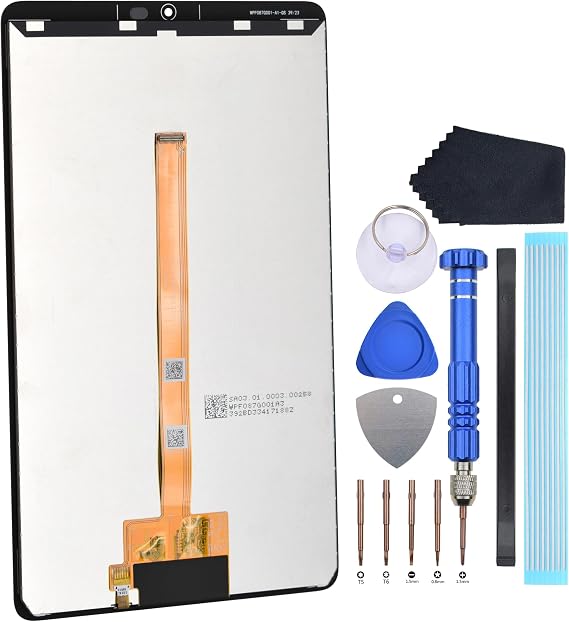
This repair part is made to replace your 8.7 shattered Samsung Galaxy Tab A9 SM-X115 display.

Fast
Shipping

Free
Return*

Secure Packaging

100% Original Products

PCI DSS Compliance

ISO 27001 Certified



What Stands Out
High-Quality Display
This TFT LCD digitizer offers exceptional clarity and vibrant colors, ensuring a superior visual experience for Samsung Galaxy Tab A9 users.
Easy Installation
Designed for simplicity, this replacement screen comes with all necessary tools, making it easy for users to install without professional help.
Durable Construction
Built to withstand daily wear and tear, this screen replacement ensures longevity and resilience, offering great value for users seeking reliability.
Product Details
| Package Dimensions | 9.92 x 7.91 x 0.98 inches (25.2 x 20.1 x 2.5 cm) |
| Item Weight | 9.2 ounces (260.82 grams) |
| Manufacturer | VEKIR |
| Item model number | VSA-screen23 |
| Date First Available | July 18, 2024 |
Who Should Buy?

-
DIY Repair Enthusiasts
Ideal for those who enjoy fixing devices on their own, saving on repair costs and learning valuable skills.
-
Budget-Conscious Users
A cost-effective solution for users looking to prolong the life of their Samsung Galaxy Tab A9 without expensive repairs.
-
Tech-Savvy Individuals
Great for users familiar with electronics who can handle installation without professional help and troubleshoot issues.

-
Non-Technical Users
Not suitable for those unfamiliar with device repairs, as self-installation can lead to further damage or complications.
Product Description
TFT LCD Digitizer Screen Replacement for Samsung Galaxy Tab A9 SM-X110
Have any Query? Chat with us
Customer Questions & Answers
-
Question:
What features should I look for in a TFT LCD digitizer screen replacement for my Samsung Galaxy Tab A9 SM-X115?
Answer: When searching for a TFT LCD digitizer screen replacement, prioritize features such as compatibility, resolution, and touch sensitivity. Ensure the product is specifically designed for the Galaxy Tab A9 SM-X115 for a perfect fit. A high-resolution screen will provide clearer visuals, while touch sensitivity ensures a smooth user experience. Additionally, consider features like anti-glare coating and durability, as these can enhance usability in various environments. -
Question:
How difficult is it to replace the screen on the Samsung Galaxy Tab A9 SM-X115?
Answer: Replacing the screen on the Samsung Galaxy Tab A9 SM-X115 can range from moderately to highly complex, depending on your technical skills. It typically involves using specialized tools to detach the broken screen and install the new LCD digitizer. For a successful replacement, follow detailed online guides or video tutorials to navigate the process effectively. This is especially important if you want to maintain the tablet's functionality and aesthetics, as improper handling can cause further damage. -
Question:
What tools do I need to replace the TFT LCD screen on my Samsung Galaxy Tab A9 SM-X115?
Answer: To replace the TFT LCD screen on your Samsung Galaxy Tab A9 SM-X115, you'll need a set of precision tools including a screwdrivers set, a plastic opening tool, and tweezers. These tools will help you safely open the device and remove the old screen without damaging the internal components. It's recommended to work on a clean, flat surface, and ensure all components are organized during the replacement process to avoid confusion and errors. -
Question:
Can I replace the screen myself or should I seek professional help?
Answer: Whether to replace the screen yourself or seek professional help depends on your confidence with technical tasks. If you possess the right tools and follow safety procedures, DIY can save costs and offer satisfaction. However, if you're uncertain or lack experience, visiting a professional service could prevent potential mishaps and guarantee a more reliable installation. Considering the complexity and the risk of damaging the tablet, weigh the options based on your personal capabilities. -
Question:
What are the signs that my Samsung Galaxy Tab A9 SM-X115 needs a new screen?
Answer: Signs you may need a new screen for your Samsung Galaxy Tab A9 SM-X115 include cracks or chips on the surface, unresponsive touch inputs, or display issues such as lines and color distortions. If the screen shows signs of flickering, or if the display is fading, these are indicators of potential problems that might necessitate a screen replacement. Addressing these issues promptly can enhance your tablet's performance and prolong its lifespan. -
Question:
What is the difference between TFT and OLED screens?
Answer: The primary difference between TFT and OLED screens lies in their technology and performance. TFT (Thin Film Transistor) screens generally offer good color reproduction and are more affordable, while OLED (Organic Light Emitting Diode) screens provide superior contrast, deeper blacks, and richer colors. If you're aiming for vibrant visuals and an immersive viewing experience, you might consider an upgrade to OLED options, but for typical tasks, a TFT LCD digitizer remains fully functional. -
Question:
How can I take care of my Samsung Galaxy Tab A9 SM-X115 screen after replacing it?
Answer: After replacing the screen, it's essential to maintain its condition to ensure longevity. Use a protective case to prevent drops and impacts and consider applying a screen protector to guard against scratches and dirt. Regularly clean the screen with a soft microfiber cloth to avoid smudges and fingerprints, and avoid exposing it to extreme temperatures. These steps will help preserve the quality and functionality of your new screen. -
Question:
What should I do if my new screen doesn't respond properly?
Answer: If your new screen is unresponsive after installation, double-check the connections to ensure everything is securely attached. Sometimes, a loose connection can cause malfunctions. Additionally, restarting the device can reset software settings that might affect performance. If issues persist, consider consulting a professional technician to inspect for any underlying problems that may have arisen during the replacement process. -
Question:
Where can I buy TFT LCD Digitizer Screen Replacement for Samsung Galaxy Tab A9 SM-X115?
Answer: You can buy the TFT LCD Digitizer Screen Replacement for Samsung Galaxy Tab A9 SM-X115 from Ubuy. Ubuy offers a diverse range of electronic accessories and device replacements, ensuring you find the right product for your needs. Their user-friendly interface makes it easier to compare options and read customer reviews, allowing you to make an informed decision about your purchase. -
Question:
Are all screen replacements for the Samsung Galaxy Tab A9 SM-X115 the same?
Answer: Not all screen replacements for the Samsung Galaxy Tab A9 SM-X115 are the same, as variations in quality and compatibility exist. It's important to choose products from reputable manufacturers to avoid issues with size, fit, or durability. Look for screens that specifically mention compatibility with your tablet model and check for user reviews to gauge performance and reliability. This choice can significantly impact your device's functionality and user experience.
VEKIR LCD Displays VSA-screen23 Editorial Review
The customer experience surrounding this product presents a mixed bag of sentiments. On one hand, there are users who appreciate the high quality and straightforward installation process of the screen, highlighting its effectiveness when functional. Reviews such as "Nice screen, easy install. Works great" underline the satisfaction from users who have had positive experiences. Another customer noted their total satisfaction with the product, reinforcing the notion that it can meet Consumer expectations. Conversely, there are significant concerns regarding reliability and quality control. One user faced a disappointing experience when their screen stopped working just over a month after installation. Another echoed this frustration, reporting that their installed screen displayed only red streaks, rendering it unusable. This kind of feedback raises questions about the product's durability and overall quality, especially when compared to other brands that have proven to be more reliable. Overall, while some customers have had positive experiences highlighting ease of use and quality, others have encountered serious issues with functionality, suggesting a variability in product reliability that potential buyers should be aware of. **
Customer Reviews & Ratings
1 customers ratings
-
5 Star
100%
-
4 Star
0%
-
3 Star
0%
-
2 Star
0%
-
1 Star
0%
Review this product
Share your thoughts with other customers
Pros
- Nice screen appearance and quality when functional.
- Easy installation process.
- Positive feedback indicating satisfaction from some users.
Cons
- Questions regarding reliability and durability, with reports of screens failing shortly after use.
Platform Trust & Buyer Confidence

JK
Jasmin
Verified buyer
“Great products and very good service: very easy and very fast international delivery.”
9 September 2026 · via Trustpilot
AG
Anke
Verified buyer
“Wonderful online shopping experience, smooth transaction from the start. Payment method works conveniently and delivery is unexpectedly fast and reliable. You go the extra mile for service. What makes this even more amazing, you deliver to Namibia. I will remain a happy Ubuy customer and will increase my purchases for sure! Thank you!”
10 September 2026 · via Trustpilot
H
Hazel
Verified buyer
“Very easy to find the products what you need, and so fast delivery, that’s why I highly recommended to others costumers to used ubuy.”
10 September 2026 · via Trustpilot
O
Opaleye
Verified buyer
“I received exactly what I ordered I was skeptical about your site because that was my first time to order. But the order came timely and neatly packaged. I was not disappointed. Thank you.”
11 September 2026 · via Trustpilot
AC
Adele
Verified buyer
“Easy to find and order what you want on the website. Delivery is quick to the UK”
8 September 2026 · via Trustpilot
Secure Checkout
Global Delivery
Easy Returns
Genuine Products
Product Price History
Important information
- Limitations : For products shipped internationally, please note that any manufacturer warranty may not be valid; manufacturer service options may not be available; product manuals, instructions, and safety warnings may not be in destination country languages; the products (and accompanying materials) may not be designed in accordance with destination country standards, specifications, and labeling requirements; and the products may not conform to destination country voltage and other electrical standards (requiring use of an adapter or converter if appropriate). The recipient is responsible for assuring that the product can be lawfully imported to the destination country. When ordering from Ubuy or its affiliates, the recipient is the importer of record and must comply with all laws and regulations of the destination country.
- Not all the products listed on Ubuy are for sale, as Ubuy is a global search engine. Products are subject to export/trade regulations.
JMD 8001
Order now and get it around Wednesday, September 30
This item is not restrict in my country.(Please click on above link if this item is not restrict in your country, So our team will review and allow.)
QTY:
Secured transaction
PCI DSS compliant and ISO 27001:2022 certified, with encrypted payments and full buyer protection on every order.
Our Top Logistics Partners
Fastest cross-border delivery
Features & Benefits
- Repairs all screen issues, including dead pixels and broken glass.
- Compatible specifically with Samsung Galaxy Tab A9 SM-X115.
- Includes disassembly tools and adhesive for easy installation.
- Factory tested for perfect quality assurance.
- Saves time with pre-installation testing via Flex Cable.
- Versatile screwdriver bits for various repair needs.
Ubuy Assurance
Experience worry-free shopping with 100% original products, PCI DSS-compliant payment security, ISO 27001-certified data protection, the fastest cross-border delivery, free returns *, and secure packaging on every order.