0 ratings

Item #:
220862725
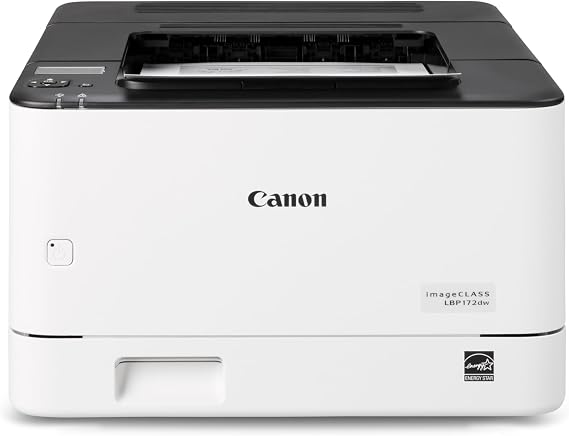
Canon imageCLASS LBP172dw Monochrome Duplex, Wireless Laser Printer, Single Function, Home Office, Mobile Ready, 35 PPM, White
Item #:
220862725
JMD 46770
Price Details
Excluding Shipping & Custom charges ( Shipping and custom charges will be calculated on checkout )
*All items will import from US
0 ratings
Write a review
In stock
 Imported from USA store
QTY:
Order now and get it around Wednesday, July 01
Secured transaction
Ubuy works hard to protect your security and privacy. Our advanced payment security system ensures confidentiality by encrypting your information during transmission using AES (Advanced Encryption Standards) and SSL (Secure Socket Layer) protocols. Your payment details are 100% secure as we do not share your payment details with third party sellers.
Our Top Logistics Partners


The LBP172dw is compact and easy to use, delivering fast print speeds of up to 35 pages per minute while minimizing maintenance.

Fast
Shipping

Free
Return*

Secure Packaging

100% Original Products

PCI DSS Compliance

ISO 27001 Certified


What Stands Out
Fast Printing Speed
Achieve efficient productivity with a high speed of 35 pages per minute, ensuring quick document handling for busy home office environments.
Wireless Connectivity
Enjoy seamless printing from your mobile devices or home network with built-in wireless capabilities, providing convenience and flexibility in your workflow.
Automatic Duplexing
Save paper and reduce printing costs with automatic double-sided printing, offering an eco-friendly solution while maintaining high-quality output.
Product Details
| Item Weight | 25 lbs (11.34 kg) |
Who Should Buy?

-
Small Offices
Ideal for small business environments requiring reliable printing with high efficiency and cost-effective monochrome outputs.
-
Mobile Professionals
Perfect for users on-the-go needing wireless capabilities and quick mobile printing without sacrificing quality or speed.
-
Home Offices
Suitable for home office users looking for a compact, dependable printer with fast printing speeds and duplex capabilities.

-
High-Volume Users
May struggle with heavy printing demands, limiting productivity for users with frequent, large print jobs in high volumes.
-
Color Printing Needs
Not suitable for users requiring color prints, as it solely provides monochrome output in black and white.
-
Advanced Functions
Limited to single function printing; users needing scanning or copying features will find this model insufficient.
Product Description
Canon imageCLASS LBP172dw Monochrome Duplex, Wireless Laser Printer, Single Function, Home Office, Mobile Ready, 35 PPM, White
Have any Query? Chat with us
Customer Questions & Answers
-
Question:
What are the key features of the Canon imageCLASS LBP172dw?
Answer: The Canon imageCLASS LBP172dw is designed for efficient home office use, featuring duplex printing for two-sided documents, wireless connectivity for easy mobile printing, and a speed of 35 pages per minute (PPM) for high-volume tasks. Its compact design allows it to fit seamlessly into tight spaces while ensuring professional-quality monochrome prints. The mobile-ready feature supports printing from smartphones and tablets, making it versatile for various work scenarios. -
Question:
How does duplex printing work on the Canon imageCLASS LBP172dw?
Answer: Duplex printing on the Canon imageCLASS LBP172dw allows the printer to automatically print on both sides of the paper. This capability helps save paper and reduces overall printing costs, making it eco-friendly and economical. Users can set this feature via the printer settings, making it ideal for creating booklets, reports, or any document where both sides are needed. -
Question:
Can I print from my mobile device with the Canon imageCLASS LBP172dw?
Answer: Yes, the Canon imageCLASS LBP172dw supports mobile printing capabilities. You can easily print from your smartphone or tablet using Canon's mobile printing applications, as well as Apple AirPrint and Google Cloud Print. This feature is especially useful for professionals who need to print documents on the go or from remote locations, enhancing flexibility and productivity. -
Question:
What is the print speed of the Canon imageCLASS LBP172dw?
Answer: The print speed of the Canon imageCLASS LBP172dw is up to 35 pages per minute (PPM), allowing users to handle large print jobs quickly and efficiently. This high speed is particularly beneficial in busy office environments where time is of the essence. Whether you're printing reports, invoices, or bulk documents, this printer ensures you stay productive without long waits. -
Question:
Is the Canon imageCLASS LBP172dw suitable for small office environments?
Answer: Absolutely, the Canon imageCLASS LBP172dw is an excellent choice for small office setups. Its compact size coupled with its robust printing capabilities makes it ideal for limited workspaces. Additionally, its high-speed performance and duplex printing feature support the productivity needs of small teams, ensuring that they can manage their document printing efficiently. -
Question:
What type of connectivity options does the Canon imageCLASS LBP172dw offer?
Answer: The Canon imageCLASS LBP172dw offers a variety of connectivity options, including wireless, USB, and Ethernet. This flexibility allows users to connect multiple devices effortlessly and tailor the printer's use to their specific office setup. Whether you need a direct connection to a computer or prefer wireless access for convenience, this printer accommodates various working styles. -
Question:
What kind of maintenance does the Canon imageCLASS LBP172dw require?
Answer: Maintaining the Canon imageCLASS LBP172dw is straightforward; regular tasks include checking and replacing toner cartridges, cleaning the printer interior, and ensuring the paper tray is free from jams. Regular maintenance ensures optimal print quality and helps maintain the longevity of the printer. This is critical for users who rely on consistent performance for their printing needs. -
Question:
What is the recommended monthly print volume for the Canon imageCLASS LBP172dw?
Answer: The Canon imageCLASS LBP172dw is recommended for users with a monthly print volume of up to 30,000 pages. This makes it suitable for small to medium-sized businesses that have moderate printing demands. This recommendation helps users avoid potential wear and tear on the printer and ensures that it continues to perform efficiently under typical workloads. -
Question:
Does the Canon imageCLASS LBP172dw support security features?
Answer: Yes, the Canon imageCLASS LBP172dw includes various security features to protect sensitive documents and data. Features such as secure print allow users to print documents only when they are physically at the printer, preventing unauthorized access to printed materials. This is particularly advantageous in office settings where confidentiality is essential. -
Question:
Where can I buy the Canon imageCLASS LBP172dw in Jamaica?
Answer: You can purchase the Canon imageCLASS LBP172dw from Ubuy in Jamaica. Ubuy offers a user-friendly platform with access to various electronic products and provides options to select the most convenient purchasing choices. Their extensive selection helps ensure that you find the right products for your needs, including this reliable laser printer.
Canon Laser Printers Editorial Review
**** The Canon printer has drawn a mixed bag of reviews from customers, with its capabilities being praised while the setup process has raised significant concerns. Users have touted the printer's ability to print automatically on both sides of the paper and highlighted its speedy performance as a key advantage. For those familiar with Canon products, the brand's reputation for producing reliable printers lends an added layer of satisfaction to many customers. However, the setup has emerged as a major hurdle for several users. The tiny display and complex navigation options have been noted as particularly frustrating, much akin to the challenging search functions found on streaming platforms like Hulu and Netflix. While some users managed to navigate the setup successfully by accessing additional support, such as software from the Canon website, others found it confusing and poorly explained in the printer's manual. A key pain point has been the printer’s tendency to be "offline," particularly for those trying to connect via USB. Despite the initial struggles with setup, the printer seems to function well once operational. Its adjustable sleep mode is Considered a nice touch, allowing users more control over power Consumption. Yet, the experience of dealing with Canon customer support left a few users feeling unsupported when they encountered issues. Overall, while the printing performance of the Canon printer is commendable, potential buyers should be prepared for a challenging setup experience. **
Customer Reviews & Ratings
1 customers ratings
-
5 Star
100%
-
4 Star
0%
-
3 Star
0%
-
2 Star
0%
-
1 Star
0%
Review this product
Share your thoughts with other customers
Pros
- Automatically prints on both sides of paper.
- Fast printing performance.
- Adjustable sleep mode.
- Generally reliable after setup.
Cons
- Complicated setup process with a lack of clarity in instructions.
Product Price History
Important information
- Limitations : For products shipped internationally, please note that any manufacturer warranty may not be valid; manufacturer service options may not be available; product manuals, instructions, and safety warnings may not be in destination country languages; the products (and accompanying materials) may not be designed in accordance with destination country standards, specifications, and labeling requirements; and the products may not conform to destination country voltage and other electrical standards (requiring use of an adapter or converter if appropriate). The recipient is responsible for assuring that the product can be lawfully imported to the destination country. When ordering from Ubuy or its affiliates, the recipient is the importer of record and must comply with all laws and regulations of the destination country.
- Not all the products listed on Ubuy are for sale, as Ubuy is a global search engine. Products are subject to export/trade regulations.
JMD 46770
Order now and get it around Wednesday, July 01
This item is not restrict in my country.(Please click on above link if this item is not restrict in your country, So our team will review and allow.)
QTY:
Secured transaction
Ubuy works hard to protect your security and privacy. Our advanced payment security system ensures confidentiality by encrypting your information during transmission using AES (Advanced Encryption Standards) and SSL (Secure Socket Layer) protocols. Your payment details are 100% secure as we do not share your payment details with third party sellers.
Our Top Logistics Partners
Fastest cross-border delivery
Features & Benefits
- Compact design perfect for small office environments.
- Fast print speeds of up to 35 pages per minute.
- Supports wireless printing from computers and mobile devices.
- Auto duplex printing saves paper and resources.
- 250-sheet capacity for continuous printing.
- Backed by a 1-year limited warranty and excellent customer support.